Online booking for spaces and resources
Choose the space or resource you manage and see how Timezer helps you keep it booked.
What do your customers book?
Choose the space or resource you manage and see how Timezer helps you keep it booked.

Tennis courts
Hourly court booking and occupancy

Padel courts
Peak pricing and recurring bookings

Football pitches
Pitch slots, deposits and memberships

Beach volleyball courts
Court booking with optional replay

Multi-sport facilities
Many courts, one calendar

Studios
Time-slot studio rental

Meeting rooms
Room booking by the hour

Event spaces
Block booking for events

Equipment rental
Rent gear by time slot

Other rentable resources
See how Timezer fits resource booking
If you rent time on a court, a pitch or a field, it fits.
A court booked by WhatsApp is a court that often stays empty
Late cancellations, no-shows and prices that never change by time of day quietly eat your occupancy.
Without Timezer
- Slots confirmed by message, then forgotten
- No-shows you never charged for
- Same price at 10am and 7pm
- No view of occupancy per court
With Timezer
- Players book 24/7 on your own page
- Deposit or full payment before they play
- Prices by hour, weekday and court
- Occupancy and revenue on one screen
Built for how a sports venue actually runs
Bookings, payments, players and the arena — pick a layer.
Advance reservations, deposits and prices that change with demand.
Advance Bookings
Customers can book and pay up to 30 days in advance, ensuring occupancy and advance revenue.
Cut no-shows
Take a deposit when they book; keep it if they don't show. Set your own rules (e.g. 30% upfront, free cancellation up to 48h).
Flexible Hours
Configure different prices by time, days of the week and courts. Maximize your revenue with dynamic pricing.
Blocks and time off
Close slots for events, maintenance or holidays in a couple of taps.
PIX, cards and packages. Money in your account, not ours.
Direct PIX
Collect PIX to your own key. You confirm the transfer; Timezer does not hold the money.
Online Payment
Integration with PIX, credit and debit cards. Receive instant payments and eliminate defaults.
Prepaid packages
Sell a bundle of sessions. Clients book from remaining credits instead of paying every visit.
Weekly regulars and memberships
Lock a slot every week and charge it automatically.
History, regulars and an app that carries your brand.
Customer Management
Complete booking history, time preferences and loyalty system for frequent customers.
Your branded PWA
Customers install your booking as an app with your icon and name—it looks like an app you created. No app store. Works on any device.
Automatic reminders
Confirmations and reminders by email and WhatsApp, without you typing.
Your brand, front and centre
Your own booking page with your logo, banner, and colours—so clients book with you, not a generic app.
Occupancy, replay clips and the hardware that records them.
Detailed Reports
Track occupancy, revenue per court, most popular times and team performance.
Court replay clips
After a booked hour, players scan a QR and share a 15–120 second highlight. Overlay inventory sits on the same booking.
Timezer Edge documentation
Guides for installing the court mini-PC agent, connecting cameras, and understanding how Edge connects to Timezer Cloud.
Team and resources
Rooms, chairs and professionals, each with its own availability.
See the real screens
Intuitive interface developed specifically for sports courts
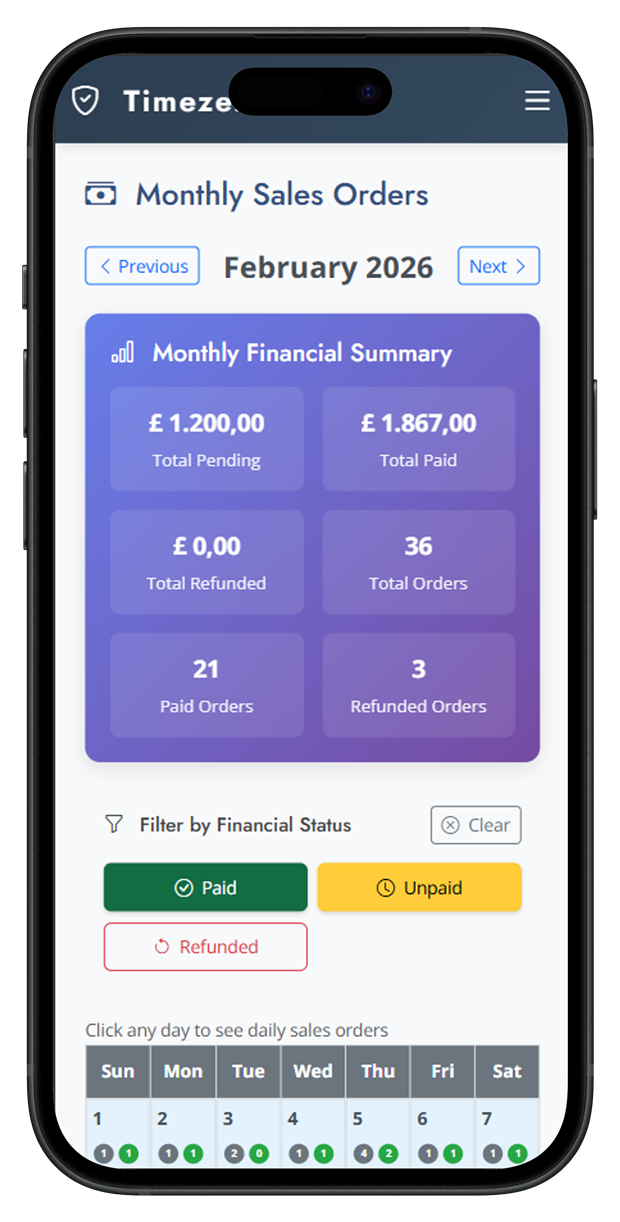
The whole month at a glance: paid, pending and refunded.
A real arena, not a slide deck
See how courts, payments and the player page work together.
How it works in 3 simple steps
Set up your court in less than 5 minutes
Configure your court
Register your courts, set operating hours and prices per period.
Share the link
Your customers access the personalized link and make bookings 24/7.
Track results
Monitor occupancy, revenue and performance through detailed reports.
Track occupancy
See which courts fill, which hours lag, and where to change the price.
Most venues publish their first court in under 5 minutes.
Why choose Timezer for your courts?
Features developed specifically for the sports market
Fill more hours
Players book 24/7 instead of waiting for a reply.
Details
Customers can book and pay up to 30 days in advance, ensuring occupancy and advance revenue.
Stop unpaid no-shows
A deposit or full payment lands before they step on court.
Details
Take a deposit when they book; keep it if they don't show. Set your own rules (e.g. 30% upfront, free cancellation up to 48h).
Price by demand
Different rates by hour, weekday and court.
Details
Configure different prices by time, days of the week and courts. Maximize your revenue with dynamic pricing.
Your arena, your app
Players install a booking app with your name and icon.
Details
Customers install your booking as an app with your icon and name—it looks like an app you created. No app store. Works on any device.
Replay that pays for itself
Clips after the hour, with local sponsors on the overlay.
Details
After a booked hour, players scan a QR and share a 15–120 second highlight. Overlay inventory sits on the same booking.
Know every court
Occupancy, revenue and peak hours without a spreadsheet.
Details
Track occupancy, revenue per court, most popular times and team performance.
From a single court to a full arena
The same product scales from one pitch to a complex with replay.
Academies
Classes, courts and regulars billed on a schedule.
Court replay, on the same booking
After the hour, players share a short clip. Local sponsors sit on the overlay. Hardware and cloud stay in Timezer.
Timezer Edge documentation
Guides for installing the court mini-PC agent, connecting cameras, and understanding how Edge connects to Timezer Cloud.
Download PDFSuccess Case: Orla Beach Arena
"Timezer has completely transformed our operation. Before, we used to lose a lot due to no-shows and phone bookings. Now, more than half of all our appointments are made online, and we receive payment in advance."
Open a live sports-courts demo
Click around a venue that already takes bookings the way your players would.
See a live exampleBooking operations: no-shows, deposits, and your own page
Reference guides for salons, clinics, and sports venues that run Timezer — how the product actually reduces empty slots.
Read the guidesAffordable plans for your business
Start free and scale as you grow
🔥 Special offer for new customers
- Booking page with your brand
- Deposit at booking to cut no-shows
- Payments into your own account
- No fee per booking
- 14 days to try it out
Questions court owners ask first
Does it work for more than one court?
Yes. Each court has its own hours, prices and availability. You manage them from one login.
Can I charge different prices at night?
Yes. Set rates by time of day, weekday and court so peak hours earn more.
How do I stop no-shows?
Ask for a deposit or full payment at booking. Your cancellation window is applied automatically.
Do players need an app store download?
No. They install your branded page on the phone. It looks like an app you created, with your icon and name.
Is replay included?
Replay is an add-on for venues that want clips after the hour. Bookings and payments work without it. Hardware setup is documented in Timezer Edge.
How long does setup take?
Most owners publish the first court in under 5 minutes: hours, prices and a shareable link.
Ready to revolutionize your business?
Join the court owners who have already increased their revenue.
Start your 14-day free trial — you can be taking bookings in under 10 minutes.
- Set up in minutes
- 14-day free trial, no card
- Cancel anytime